Showing posts with label Featured. Show all posts

Oct 7, 2013

In this series we round up the technology-based articles from around the web that have caught our eye in the last week. Have something we should know about? Send us a note!

Weekly Roundup


  • Up until now, AT&T has exclusively carried the Moto Maker design studio for the Moto X that allows users to customize their model to any color combination they choose. Now, Moto Maker may be making its way to Verizon as soon as Nov. 11.
  • Well what do you know? It seems every couple of days we see more and more leaks of the upcoming Nexus 5. Next on the list is a purported service manual that leaked on line, detailing many more specs of Google's next flagship. LG has since asked original leaker's Android Police to remove the images. A copy of the manual can still be found at Engadget (also taken down). [Android Police]

Galaxy Note 3 and Galaxy Gear Review Roundup


Odds and Ends


This is either the most terrifying thing I've seen, or the coolest. Like something out of a Terminator movie, Boston Dynamics' Cheetah  robot has come untethered and is now able to run outdoors by way of a really loud motor. Its name is the Wildcat. Be afraid... very afraid...
Credit: Engadget via Boston Dynamics Youtube


Sep 30, 2013

In this series we round up the technology-based articles from around the web that have caught our eye in the last week. Have something we should know about? Send us a note!

In Case You Missed It


Everybody Chill Out - I Got This [Derek Gelinas]

Weekly Roundup


  • What were the changes your lowly iPad or Android phone could bring down an airliner? Not much. The airlines think so too. [The Verge]
  • Blackberry is in dire straits. Losses upon losses, not helped by sales of the Z10 have it teetering on the edge. [ZDnet]
  • If you use Google's Chrome browser you may have seen a change in the way you access your Chrome apps. Here's what's been changed. [PCWorld]
  • So, what do you think? Absolutely hate the way Chrome switched all of your stuff around? Here's how to put back. [Computerworld]
  • Evernote unveils a company-branded marketplace in the hopes you'll live the 'Evernote Lifestyle'. How about a fancy Evernote backpack? Or perhaps a $75 stylus? [The Verge]


Odds and Ends


Did you ever wonder what it was like to sit in line at an Apple store waiting to be one of the first to get your hands on an iPhone 5s? Indie film maker and one-time Apple whistle blower Casey Neistat and his team take his film camera to the Fifth Avenue Apple Store in Manhattan for a little side line fun.
(Credit: CNet)


Sep 26, 2013

Disclaimer: Derek Gelinas is a guest writer for TechXaminer. He is an Android fanatic who co-founded Carbon ROM, runs OSX, Linux, and Windows environments, and is generally cranky. His rants do not necessarily reflect the opinions of TechXaminer, though it is his personal belief that they would be better off if they did.


So the iPhone has this fancy new fingerprint scanner. Everyone, predictably, has their panties all a-twist about it. "OMG THAT'S NOT REALLY SECURE WE HAVE TO CRACK IT TO PROVE iPHONE IS BAD," or something to that effect. This shit again? Really? Must be September!

To the surprise of no one, someone found a way to beat it. Of course it was beaten - anyone who knows even the slightest bit about biometrics knows that fingerprint security is pretty far down the "things you can use to secure a system" totem pole. It can be beaten. We know that. We've always known that. Big whoop, I watched "Sneakers" too. Just because you can beat it doesn't mean you don't need to put in a good bit of work. You're gonna need the print - easy enough - and you're gonna need the time to scan it, print it in high res, etc. You're going to need to want to do it.

Which brings me to my next point. It doesn't matter. Not one bit. In fact, it's still a fantastic feature, and one that I hope we see in the Android world soon. Do you know many people who bother with a screen lock? Of course you don't. It's a giant pain in the ass and even enthusiasts can't be bothered. I can't even imagine the supreme effort of will it would require to get even one of my family members to use it. They don't care and they never will.

Now, those same people who love using iPhones but can't be bothered with a lock screen have a way to lock their phone with zero effort. Is it going to stand up to a focused attack? Hell no. Will it keep their idiot friends, coworkers, or your average thief from accessing your personal data? Yup. And here's a secret - that's all it needs to do. Remember face unlock? Not exactly hard to fool, and it isn't going to really keep anyone out really wants in. I don't recall the Android community tripping over themselves to attack that, though. It wasn't even implemented well - no one uses it because the damned thing only works under basically perfect conditions. The fingerprint scanner is no different - it just works better. Unless there was an epidemic of phone thieves running around wearing other people's cut-off faces that I didn't hear about, there won't be a sudden increase in fingers being chopped off, either. Anyone with data that requires real security isn't going to be relying on a stupid thumbprint.

And let's not fool ourselves about security, my Android brethren. How many of you are running a custom ROM? I don't care if you're using a lock screen or not - your phone isn't the tiniest bit secure when anyone can boot into your bootloader and flash anything they want.

Look, I'm an Android guy. Touchwiz and Sense make me want to throw my phone out the window onto train tracks, where it will hopefully be peed upon by a luddite hobo before being atomized by a passing bullet train. As far as I'm concerned, stock Android and open source are where it's at. So I get it. I'm basically a fanboy for Android. But here's the thing, guys - we're not the underdog anymore. Android is huge. It's advanced as hell. It has better and more features than iOS in many ways. Jumping all over the latest iPhone to show how clever and superior we are only serves to make us look like assholes. It brings the whole level of the conversation down. Some people like their iPhones - pretty sure that doesn't make them iSheep. (note: Windows phone and Surface users, on the other hand, are fair game. I hate those guys.)

Maybe Apple oversold the fingerprint scanner a bit. There's a shocker - that's kind of their thing, man. It doesn't mean that from an engineering and user perspective they don't have a real winner on their hands. The iPhone just got a whole lot more secure in real-world conditions for their users, and that's awesome. Will it stand up to targeted attacks? No. I'd wager very very few devices would. What it will do is make the user experience better, and that's the whole point. That's good for all of us.

So please, shut up about it.

Sep 23, 2013

In this series we round up the technology-based articles from around the web that have caught our eye in the last week. Have something we should know about? Send us a note!

iPhone 5c/5s and iOS 7 Link Favorites


Living with iOS 7 [Macstories]

News You May Have Missed


Odds and Ends


How about this video from the YouTube channel of Stuart Edge? They do a couple of good deeds and catch the reaction of restaurant servers as they receive $200 tips. Touching to say the least.


Sep 16, 2013

In this series we round up the technology-based articles from around the web that have caught our eye in the last week. Have something we should know about? Send us a note!

iPhone 5c/5s Hands On Roundup


Apple iPhone 5s hands-on (update: video) [Engadget]
Apple iPhone 5s hands-on video and impressions [The Verge]
Hands-on with the new 64-bit A7-powered iPhone 5s with new M7, camera features & Touch ID [Apple Insider]
iPhone 5C Hands On: Your Budget iPhone [Mashable]
A tale of two iPhones: Hands-on with the iPhone 5S and iPhone 5C (update: video!) [Ars Technica]

Weekly Roundup


Roku for Android app allows streaming of video to set-top box – from some devices [9to5 Google]
Roku plays catch up to Google's Chromebox.

T-Mobile Moto X variant now available from Motorola for $599 [9to5Google]
T-Mobile subscribers now have access to the Moto X, but only in white and black for now.

LTE Nexus 7 now available from Google Play [Androidcentral]
The popular Nexus 7 tablet now with LTE connectivity.

Hands on with Apple's iPhone 5c and 5s [Computerworld]
Apple revealed the iPhone 5s and 5c last week. Computerworld has a hands on.

PayPal to offer hands-free payment through smartphone app [Computerworld]
Users of the Paypal service now have more options to pay via their smartphones.

iOS 7 is available on September 18 for certain devices [Gigaom]
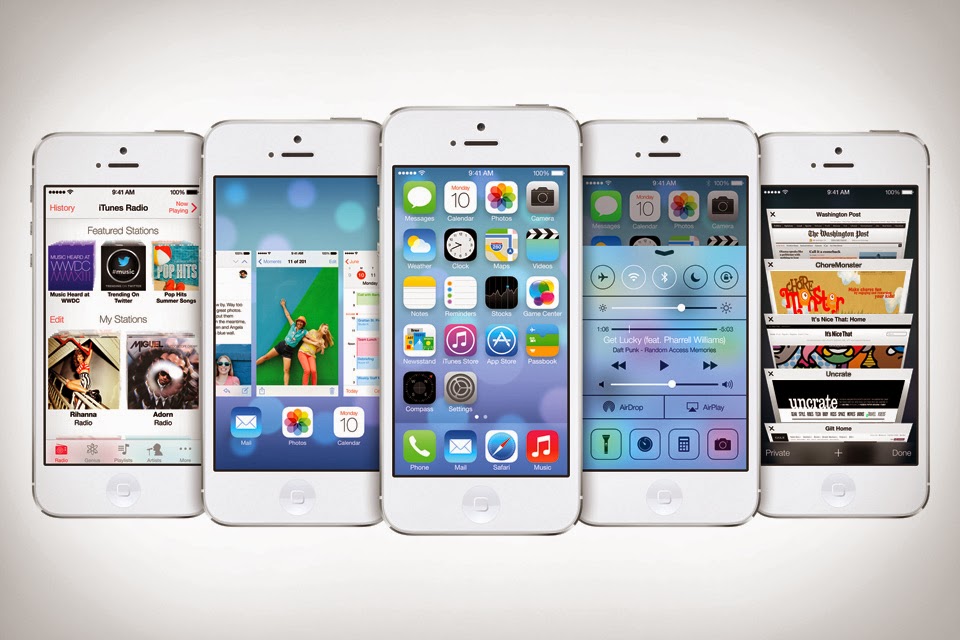
Along with the announcement of the iPhone 5c and 5s, Apple will release iOS on Sept. 18.

Wall Street hammers ‘clueless’ Apple over high iPhone 5c price [BGR]
What do you think? Is Apple's 'low end' iPhone too expensive?

Video: Apple shows off new iPhone 5s and iPhone 5c key features [BGR]
Official Apple videos showing off the iPhone 5s and 5c

Amazon's next-gen Kindle Fire HD revealed in leaked photos [The Verge]
The secret is out. Amazon's next Kindle Fire HD smiles for the camera

Haswell signs up four new Chromebooks [Cnet]
Thought the Google Chromebook was dead? Think again...

Our best look yet at a possible Nexus successor [Androidcentral]
The best evidence yet that a follow up to the Nexus 4 is coming

Gold HTC One appears on the heels of iPhone 5s [Android Community]
If Apple can do gold, why can't HTC?

Twitter #Music tries again with new Spotify app [The Next Web]
Did you know that Twitter #Music even existed? Spotify tries to help.

Jul 9, 2013

I have had Google Glass for two weeks now, and if I had one word to describe it, I would have to say, Awesome! Especially after the XE7 software update with its new features and enhancements. 

First, lets start with the device itself. Google gives you two attachments: a clear attachment and a Maui Jim sunglass attachment. During the heatwave over the July 4th weekend I have been using the sunglass attachment and it works very well, and looks stylish. The device, unfortunately, is not balanced as all the computing parts are on the right side. (For a complete breakdown check out this great post over at Catwig.

The device fits on your face very comfortably though, with or without, the attachments. They feel like sunglasses, or regular glasses, albeit a tad bit heavier. 


After a few days, it feels normal to have Glass on. It sits on your face and feels rather unobtrusive. You don’t see the prism in your perspective and only see the screen when looking up and while it's activated. I have the "head wake up detection" set to 20 degrees, which allows me to tilt my head up to wake up glass. Sort of like a “what's up" head gesture.

You do get a lot of different looks from people while wearing glass, ranging from the inquisitive look, to the “look at this douche bag” look. I have been averaging about 5 people a day asking me about Glass, and I do about 2 demos a day. The most common response with the demos is, “Wow this is so cool!”, followed by being asked if I could take a picture of them with their smart phone while they have Glass on. Of the 5 people a day, I would say 3 out of the 5 would buy it if the price is right when it is released to the masses ($300-$500).

Now, on to daily use of Glass. A typical day for me is to put Google glass on in the morning while getting ready for work. Immediately, I am greeted by the OK Glass screen and scroll my timeline, which shows the weather forecast for home and work, meetings for the day, today’s top stories, and traffic to work; essentially my Google Now. 


When I head to work, I use Navigation which puts the HUD up in my prism, along with turn by turn directions through the bone induction speaker. Once I get to work, my automatic check in kicks in which is shared with my friends on Google Plus. Glass is tethered via bluetooth to my Nexus 4 for data and other functionality (GPS, Voice, Text). I turn off Google Voice forwarding from 9 to 5 to the Nexus so I don’t get personal phone calls. I get my voicemail to text transcriptions through Glass with a notification. Important emails come to my Glass, as well as Twitter Direct Messages throughout the day allowing me to read them quickly and even reply if need be.

The great thing about Glass is that I can be sitting in my office working on a spreadsheet or report and hear notifications. By nodding my head upwards I can see my text, email, meeting reminder or Twitter DM without pulling my hands and eyes away from what I'm doing. When I am close to leaving the office, I can take a quick glance at how the traffic is on the way home. With XE7, you now have the ability to view web pages and YouTube videos with Glass. Here is a demo video from SlashgearTV:


This adds a whole new dimension to Glass allowing you to be less dependent on pulling a phone out of your pocket. You basically pan and zoom websites using your head and the touchpad, even allowing you to play videos and click on links! However, Glass runs extremely hot after a few minutes of browsing for me. 

Throughout the day, I can take quick pictures/videos and post them to Twitter, Facebook, or Google Plus by sharing them privately, publicly, or direct to contacts. Taking pictures with Glass is very simple, either with the voice commands, or using the button directly on Glass. The advantage to Glass is since the camera is on you at all times you can capture moments quickly.

To post a status update to social media direct from Glass, I added the posting email address of each social network as a contact, along with a picture of the social network as the contact pic. What this allows me to do is say, for example, "Ok Glass, Send a message to, Twitter, 'Having a great time at my family reunion.'"

I love Glass right now and I just see it getting better and better with the new software updates and apps that are rolling out. I will start reviewing some of these as well as provide another update on Glass when version XE8 rolls out.

Until then, if you want to know more about Glass follow me on Twitter @wlassalle or Google Plus gplus.to/wlassalle .


Jun 12, 2013


Today has been a good day for Samsung, first with the announcement of the Galaxy S4 Zoom, and now announcing the Galaxy Note 8.0 on AT&T. See below for the full press release and a video:


Samsung Galaxy Note 8.0 TABLET PROVIDES ENDLESS WORK, ENTERTAINMENT POSSIBILITIES
AT&T Offers the Largest and Best Portfolio of 4G LTE-Connected Tablets

DALLAS, June 12, 2013 AT&T, the U.S. leader in 4G LTE-connected tablets, and Samsung Telecommunications America (Samsung Mobile) announced today the addition of the Samsung Galaxy Note® 8.0 to AT&T’s portfolio of connected products. The 4G LTE-connected Galaxy Note 8.0 will be available exclusively with AT&T in the coming weeks. 

The Galaxy Note 8.0 runs on AT&T 4G LTE, which currently covers more than 200 million people in the U.S.; with plans to expand to cover 300 million people by the end of 2014.  In a report by independent testing organization RootMetrics, AT&T's 4G LTE network was called “blazing fast."  The report found AT&T’s 4G LTE network delivered the fastest pure LTE speeds in markets where AT&T provided 4G LTE*. 
According to Strategy Analytics, tablet sales in the United States will rise from 49.8 million in 2012 to 103.7 million in 2017.  As tablet sales continue to rise, AT&T has cemented itself as the leading tablet provider, offering the widest and best selection of tablets of any U.S. carrier. 

“Demand for 4G LTE-connected tablets is growing, and we’re offering our customers the most choice and the best portfolio.  The Galaxy Note 8.0 is an awesome tablet and flies on 4G LTE,” said Chris Penrose, Senior Vice President – Emerging Devices, AT&T. “We expect customers to be excited about the Galaxy Note 8.0’s versatility that makes its useful for work and entertainment.”

The Galaxy Note 8.0 is the ideal premium tablet for work, play, home, or on the go. Galaxy Note 8.0 also features several new business solutions, including SAFE™ (Samsung for Enterprise) technology, which ensures a secure work environment even away from the office. With SAFE, Samsung layers extra features on top of native Android to make your tablet more secure and easier for your employer’s IT department to manage. Using Polaris Office, customers can view, create and edit documents, spreadsheets and presentations – right on their tablet. They can also add handwritten notes and annotate on PowerPoint and Word documents.  

With Multi Window, users can open two different applications side-by-side to perform two tasks at once, such as checking email while drafting notes.  The S Pen™, exclusive on Samsung Note devices, comes integrated in the Note 8.0 and offers precision, control and an unprecedented note taking capability. The S Pen can replicate a mouse and simulate writing or sketching, eliminating the need for a notepad, sketchbook, sticky notes and rolodex contacts. Air View allows users to preview emails, calendar events, photos and videos just by hovering over the screen with the S Pen.

Galaxy Note 8.0 includes several entertainment options including WatchON™, a new search and recommendation service which makes finding TV shows and on-demand video content faster, easier and more personalized. WatchON simplifies the process of discovering new content to watch by searching across multiple content sources (such as live TV, YouTube, and streaming video-on-demand sources) to recommend movies and TV shows. For users more interested in reading a book, the new Reading Mode creates a comfortable reading experience in all lighting conditions by optimizing the gorgeous screen to provide perfect illumination and tone. And with the ability to annotate directly with the S pen, all on a size made easy to hold, reading has never been more enjoyable, even on the go. 

The Galaxy Note 8.0 is powered by Android 4.1 (Jelly Bean) and a 1.6 GHz quad core processor with a 4,600 mAh battery. Customers will experience fast downloads with little lag time helping enhance their ability to move between home screens and apps. The Galaxy Note 8.0 weighs 12 ounces and has an eight inch display, with 189 pixels per inch, which provides users with a vibrant HD quality picture with plenty of room to work. Users can play videos in 1080p resolution, and the 5-megapixel rear facing camera with digital zoom can shoot 720p video, while the 1.3-megapixel front facing camera can handle video chats at 720p resolution. Galaxy Note 8.0 comes with 16GB internal memory and a microSD slot for up to 32GB expandable memory.  Customers also receive 50GB of free storage with AT&T Locker (available via an update), so users can easily store their videos, pictures, and files and access form multiple devices.

* Limited 4G LTE availability in select markets. LTE is a trademark of ETSI. Claim is based on a comparison of U.S. national carriers’ average 4G LTE download speeds for Android™ and Windows smartphones and iPhone 5. 4G speeds not available everywhere. In 4G LTE coverage areas, talk and surfing data at the same time uses AT&T’s 4G HSPA+ network.

About AT&T
AT&T Inc. (NYSE:T) is a premier communications holding company and one of the most honored companies in the world. Its subsidiaries and affiliates – AT&T operating companies – are the providers of AT&T services in the United States and internationally. With a powerful array of network resources that includes the nation’s largest 4G network, AT&T is a leading provider of wireless, Wi-Fi, high speed Internet, voice and cloud-based services. A leader in mobile Internet, AT&T also offers the best wireless coverage worldwide of any U.S. carrier, offering the most wireless phones that work in the most countries. It also offers advanced TV services under the AT&T U-verse® and AT&T |DIRECTV brands. The company’s suite of IP-based business communications services is one of the most advanced in the world.
Additional information about AT&T Inc. and the products and services provided by AT&T subsidiaries and affiliates is available at http://www.att.com/aboutus or follow our news on @ATT, on Facebook at http://www.facebook.com/att and YouTube at http://www.youtube.com/att.
Samsung, Galaxy S, TouchWiz, S Pen, Samsung Smart Switch, ChatOn, WatchOn, S Voice, Story Album, and Air View are all trademarks of Samsung Electronics Co., Ltd.  Android and Google Play are trademarks of Google Inc. Other company names, product names and marks mentioned herein are the property of their respective owners and may be trademarks or registered trademarks.
About Samsung Telecommunications America
Samsung Telecommunications America, LLC, (Samsung Mobile) a Dallas-based subsidiary of Samsung Electronics Co., Ltd., researches, develops and markets wireless handsets, wireless infrastructure and other telecommunications products throughout North America. For more information, please visit www.samsung.com.

About Samsung Electronics Co., Ltd.
Samsung Electronics Co., Ltd. is a global leader in technology, opening new possibilities for people everywhere. Through relentless innovation and discovery, we are transforming the worlds of televisions, smartphones, personal computers, printers, cameras, home appliances, LTE systems, medical devices, semiconductors and LED solutions. We employ 236,000 people across 79 countries with annual sales of US$187.8 billion. To discover more, please visit www.samsung.com.
About Samsung SAFE™

Disclaimer of Warranties: TO THE FULL EXTENT PERMITTED BY LAW SAMSUNG ELECTRONICS CO., LTD., SAMSUNG TELECOMMUNICATIONS AMERICA, LLC, AND THEIR AFFILIATES (COLLECTIVELY REFERRED TO HEREIN AS THE “SAMSUNG ENTITIES”) EXPRESSLY DISCLAIM ANY AND ALL WARRANTIES, EXPRESS OR IMPLIED, INCLUDING ANY WARRANTY OF MERCHANTABILITY, FITNESS FOR A PARTICULAR PURPOSE, INTEROPERABILITY OR NON-INFRINGEMENT, WITH RESPECT TO INFORMATION TECHNOLOGY SECURITY PROTECTION, SAFE™ DEVICES AND SAFE™ APPLICATIONS. IN NO EVENT SHALL THE SAMSUNG ENTITIES BE LIABLE FOR ANY DIRECT, INDIRECT, INCIDENTAL, PUNITIVE, OR CONSEQUENTIAL DAMAGES OF ANY KIND WHATSOEVER WITH RESPECT TO INFORMATION TECHNOLOGY SECURITY PROTECTION, SAFE™ DEVICES OR SAFE™ APPLICATIONS. In addition, information technology security protection will be affected by features or functionality associated with, among other things the e-mail platform, master data management, and virtual private network solutions selected by the software provider, solution provider or user. Choice of an e-mail, master data management, and virtual private network solution is at the sole discretion of the software provider, solution provider or user and any associated effect on information technology security protection is solely the responsibility of the software provider, solution provider or user. For complete statement of limited warranty, please refer to www.samsung.com/us/safe, available on the web and where Samsung smartphone and Galaxy Tab™ devices are sold.

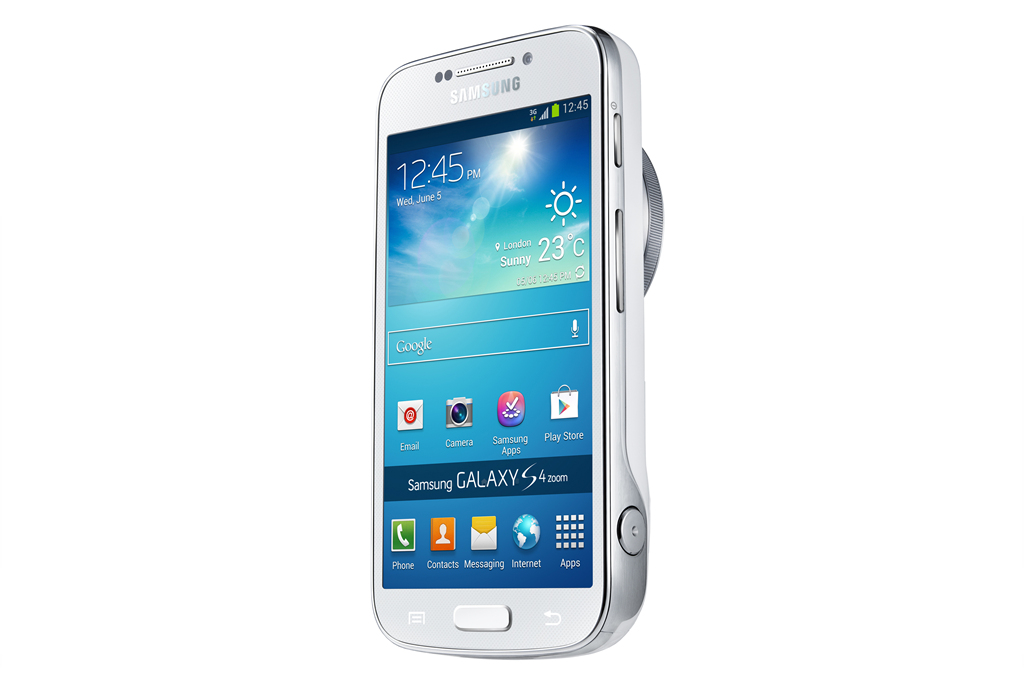
We've all wanted a phone with better zooming than the standard digital zoom most phones come with. Well, Samsung has heard our pleas and come up with a solution: The Galaxy S4 Zoom. It boasts a nice 16 Mega-Pixel camera with 10x optical zoom, and it also has OIS (optical image stabilization).

Whether you're the Instagram addict who wants to take a close-up of their food, or you just want to take a picture of an overhead airplane, this phone will get you there!

See below for a slideshow of pictures as well as the full press release.


Samsung Introduces the GALAXY S4 zoom – the first smartphone to offer 10x optical zoom, for perfect picture taking
A revolutionary new device that converges the best of a high performance smartphone and camera, the GALAXY S4 zoom delivers the best of both worlds

LONDON, UK – June 12, 2013 –Samsung Electronics Co., Ltd. today announced the launch of the Samsung GALAXY S4 zoom, a powerful new device which combines the stylish heritage of the latest GALAXY S4 smartphone with advanced photographic capabilities.
Part of the GALAXY S4 family, the GALAXY S4 zoom is the realization of Samsung’s mission to create a single device that can fulfill the role of both an industry leading smartphone and a high-end compact camera. Combining 10x Optical Zoom, 16 Mega Pixel CMOS Sensor, OIS and Xenon Flash with the very latest Samsung GALAXY S4 technology, the GALAXY S4 zoom sets new standards for perfect mobile photography. It is the ultimate smartphone and camera experience in one, and the only device you’ll ever need.
“The Samsung GALAXY S4 zoom represents yet another step forward in the way Samsung is working to enhance the lives of our customers around the world,” said JK Shin, President and CEO, Head of IT & Mobile Communications Division, Samsung Electronics. “As communication continues to become increasingly visual in nature, people wish to capture and share their moments in the highest quality possible, but often do not have the space or inclination to carry a dedicated camera for this purpose. The GALAXY S4 zoom changes this forever, combining the industry leading functionality and connectivity of the GALAXY S4 with the high quality photographic experience you’d expect from a compact camera. The result is truly the best of both worlds, without compromise.”

Revolutionary new interface
Do it all and miss nothing thanks to the revolutionary new Zoom Ring, a simple and intuitive way to access the GALAXY S4 zoom’s key features.  When you’re in the middle of a phone call and you see something you absolutely have to share, a quick twist of the Zoom Ring will activate the In-Call Photo Share feature, letting you capture and send an image directly via MMS to whoever you are talking to simply.
For easy camera navigation, the Zoom Ring can be used to activate the Quick Launch and Shortcut features, giving you instant access to multiple camera modes including Auto, Gallery and Smart Mode with a simple twist.
The Zoom Ring also revolutionizes conventional camera zoom controls. Optical zoom control replaces traditional dials and buttons with smooth, easy-to-operate digital controls. Professional-quality accuracy and unprecedented ease of use are just a twist away, making it easy to compose a scene and capture wide-angle shots or tight close-ups.

Capture the best images
When it comes to high quality photography, bigger isn’t always better. The compact GALAXY S4 zoom’s best-in-class 10x Optical Zoom and 16MP BSI CMOS Sensor lets you capture beautiful images from far away or up close and personal, in all light conditions, without having to carry heavy camera gear around with you.  Furthermore, the built-in Optical Image Stabilizer (OIS) helps keep the camera perfectly still even when you’re not, reducing blur and stabilizing the image while zoomed in for high-quality photos and video.
Photo Suggest instantly connects you to huge libraries of images taken by fellow photographers, to help you find and compose your best shots anywhere in the world. Photo Suggest can even direct you to the ideal nearby location which will give you the vantage point you need for that perfect photo.
The GALAXY S4 zoom also features Samsung’s popular Smart Mode, so you can stop worrying about settings and start taking professional-quality artistic shots. Simply choose from a series of pre-set modes and the camera will automatically adjust to ensure you capture the best photo possible. Use Drama Shot to merge continuous shots of moving objects into a single composed image, or Action Freeze to instantly capture high-speed action. If you aren’t sure which Smart Mode to select, the Smart Mode Suggest feature can assess the scene for you and provide a short list of the best options for your consideration based on surrounding factors such as light levels, focal length, or face detection, ensuring you always get the best shot you want.

Unlimited entertainment in the palm of your hand
The GALAXY S4 zoom's heritage is evident throughout, from its sleek and stylish design to the powerful, yet intuitive user interface. Running on Android Jelly Bean 4.2, the GALAXY S4 zoom boasts many of the same features as the recently launched GALAXY S4, including Touchwiz, which lets you fully customize various aspects of your device including the lock screen and notification bar, for a truly personal mobile experience.
When you return from your travel adventures, Story Album lets you arrange all of your treasured images and videos into one timeline to share with friends and loved ones. You can also edit images and even order prints directly from the device through a partnership with blurb*. If you’d rather transfer your images to your laptop or tablet for safe keeping, Samsung Link lets you do so quickly and easily with just the touch of a button. Alternatively, you can sync all of your data in your own personal cloud through HomeSync, providing the ultimate peace of mind and ensuring your images and videos are waiting for you whenever you need them.
The GALAXY S4 zoom features the new Samsung Hub, a one-stop destination for all of the latest music, videos, books and games. Search, download and enjoy all of your favorite entertainment at the touch of a button, all directly from your device. When you find that amazing new track or game that you can’t wait to share with your friends, Group Play lets you connect directly with their Samsung devices so you can all listen and play together, without the need for a Wi-Fi AP or cellular signal.
For multimedia content and more detailed information, please visit www.samsungmobilepress.com.

Note to Editors:

Samsung GALAXY S4 zoom Product Specifications:
Network
LTE
2.5G (GSM/ GPRS/ EDGE): 850 / 900 / 1800 / 1900 MHz
3G (HSPA+ 21Mbps): 850 / 900 / 1900 / 2100 MHz
4G (LTE Cat 3 100/50Mbps) : up to 6 different band sets(Dependent on market)
3G
2.5G (GSM/ GPRS/ EDGE): 850 / 900 / 1800 / 1900 MHz
3G (HSPA+ 21Mbps): 850 / 900 / 1900 / 2100 MHz
Display
4.3 inch qHD sAMOLED (960x540) screen
AP
1.5GHz Dual-Core Processor
*The selection of AP will be differed by markets
OS
Android 4.2 (Jelly Bean)
Camera
Main (Rear): 16 Mega pixel with x10 Optical Zoom and enhanced SMART Modes, OIS
                        24-240mm, F3.1-F6.3
Sub (Front): 1.9 Mega pixel camera
ISO: Auto, 100, 200, 400, 800, 1600, 3200
Continuous Shot: 4fps MAX with AF
Format: JPEG, PNG, GIF, WBMP, BMP, AGIF
Xenon Flash,
SMART Mode, Expert Mode(P/S/M/C), My Mode
Video
Codec: MPEG4, H.264, H.263, VC-1, VP8, WMV7/8, Sorenson Spark
Recording & Playback: Full HD (1920x1080 30p)
Audio
Codec: MP3, AMR-NB/WB, AAC/AAC/eAAC, WMA, Vorbis(OGG), FLAC, apt-X
Camera
Features
SMART Mode(25): Smart mode suggest, Beauty face, Best photo, Continuous shot,
Best face, Kids shot, Landscape, Dawn, Snow, Macro, Food, Party/Indoor, Action freeze,
Rich tone (HDR), Panorama, Waterfall, Animated photo, Drama, Eraser, Sound & Shot, Silhouette, Sunset, Night, Fireworks, Light trace
Additional Features
Samsung Link, Samsung ChatON
S Voice, S Translator
Group Play: Share Music(MP3), Share Picture(JPEG, GIF), Share Document(PDF, PPT), Play Games
 Story Album, Trip Advisor, Paper Artist
Google Mobile Services
Chrome, Downloads, Google Maps, Gmail, Google Search, Google Settings, Google Plus,
Google Local, Google Play Store, Google Messenger, Google Navigation, Youtube,
Google Talk, Voice Search, Google Play Movie & TV, Google Play books, Google Play Music,
Google Play Magazine
Connectivity
WiFi a/b/g/n 5GHz
NFC,  Bluetooth® 4.0 (LE)
A-GPS + GLONASS
Sensor
Accelerometer, Geomagnetic, Proximity, Gyro, RGB Light
Memory
8GB Internal memory (User memory approximately 5GB) + microSD slot (up to 64GB)
1.5GB RAM
*User memory space may be less than the total memory space due to system files. User memory may differ by region, carrier, and supporting language, and may change after software upgrade.
Dimension
125.5 x 63.5 x 15.4 mm, 208g (with standard battery)
Battery
2,330mAh

* All functionality, features, specifications and other product information provided in this document including, but not limited to, the benefits, design, pricing, components, performance, availability, and capabilities of the product are subject to change without notice or obligation.

* Android, Chrome, Downloads, Google Maps, Gmail, Google Search, Google Settings, Google Plus,
Google Local, Google Play Store, Google Messenger, Google Navigation, Youtube, Google Talk, Voice Search, Google Play Movie & TV, Google Play books, Google Play Music and Google Play Magazine are trademarks of Google Inc.

* Samsung GALAXY S4 zoom uses Corning’s new Gorilla® Glass 3 with Native Damage Resistance™. This cover glass, Corning’s newest formulation, enables improved damage and scratch resistance and reduced scratch visibility.

* Blurb, the global creative publishing platform, partners with Samsung to power worldwide book and magazine print production and fulfillment within the GALAXY S4 zoom’s new Story Album application. Users of Story Album will now be able to automatically create professional quality print photo books and magazines quickly and seamlessly from their camera phone images.

About Samsung Electronics Co., Ltd.
Samsung Electronics Co., Ltd. is a global leader in technology, opening new possibilities for people everywhere. Through relentless innovation and discovery, we are transforming the worlds of televisions, smartphones, personal computers, printers, cameras, home appliances, LTE systems, medical devices, semiconductors and LED solutions. We employ 236,000 people across 79 countries with annual sales of US$187.8 billion. To discover more, please visit www.samsung.com

Jun 3, 2013

In this series we round up the technology-based articles from around the web that have caught our eye in the last week. Have something we should know about? Send us a note!


In Case You Missed It


Weekly Roundup


Here comes the white Nexus 4 on T-Mobile and Google Play [9to5 Google]
After being seen in the wild quite a few times, most people didn't think it was the real thing. Well, Google and T-Mobile have made the white Nexus 4 a sure thing.

Chicago Sun-Times trains reporters to shoot with iPhones after laying off all its photographers [The Verge]
Move over professional photogs; you're not wanted anymore. Make room for the roving mobile phone reporters. Is this for real?

Yahoo eliminates classic Mail, requiring users to agree to Gmail-like email scanning [The Verge]
If you've been using Yahoo! Mail's classic interface, say goodbye on June 3rd, as Yahoo turns off classic, and moves everyone to the new design along with new Terms of Service in tow. Are you going to miss it?

A closer look at what's new in Windows 8.1 [ZDnet]
The Start button is back!

The Moto X phone will be made in the US and is coming this summer, says Motorola [The Verge]
The mysterious Moto X is real according to Motorola CEO Dennis Woodside. He didn't reveal many details but it is supposedly coming in October of this year.

Time to back away from the cookie jar? Introducing nutrition info in search [Official Google Search Blog]
Ever wonder how many calories are in a mango? Well, now you can. Google Search is including nutritional information on over 1000 fruits, vegetables, meats, and meals. Rolling out to the US in the coming days.

Fan TV revealed: is this the set-top box we’ve been waiting for? [The Verge]
Fanhattan co-founder and CEO Gilles BianRosa unveiled Fan TV at the D11 conference. Fan TV combines a streaming media box (ala Apple TV & Roku) and a set-top cable box with cloud DVR. But will it catch on?

Apple announces new $229 16GB iPod touch: 4-inch Retina display, no rear-facing camera [The Verge]
Fans of the smaller 16GB version of the iPod Touch missed out on the newer design of the 32GB and 64GB versions when they were first revealed. Apples makes up for it with a new 16GB version.

Samsung Introduces the GALAXY S4 mini: A Powerful, Compact Smartphone [Samsung Official Global Blog]
Samsung reveals a smaller 4.3 in. version of its 5 inch flagship phone. Is this more your size?

Have you given the new Gmail inbox a spin? I've become a big fan of it. Click the link for details on how you can flip it on before it begins to roll out.

T-Mobile subscribers and fans of the upcoming BlackBerry Q10 can now own BB's QWERTY BlackBerry 10 smartphone for $100 up front (w/ 2yr plan) or $580 outright.

Months of negotiations for Facebook to acquire Israel-based social navigation app Waze fell apart on conflicts as to whether or not to relocate the Waze team.

PayPal didn't exactly win hearts with its decision to deny a reward to a 17-years old for finding a vulnerability on its website. Paypal provides an explanation.

Odds and Ends

Have you ever experienced a 17-year Cicada emergence? We had one in my hometown of Chicago a couple of years ago and it was the most amazing thing I'd ever seen. Filmmaker Samuel Orr films an incredible time-laps of one of mother nature's creepiest, yet harmless, events. [Mashable]

May 20, 2013

In this series we round up the technology-based articles from around the web that have caught our eye in the last week. Have something we should know about? Send us a note!


This week we wrap up all of the news from Google I/O keynote from around the web. Google's 3+ hour keynote took place on May 15, 2013. It can be found here.


News from Google I/O


Using Google Now for Reminders [Lifehacker]
A detailed guide on using the new Reminders tool in Google Now, including using Location Services for Reminders, which is a favorite personal feature of mine!

Google Glass becomes more useful with new Facebook, Twitter, and Tumblr apps [The Verge]
Several new apps for Google's Glass were announced at Google I/O including Twitter, Facebook, Evernote, and Tumblr among others. Twitter for Glass, for example, allows Google Glass wearers to post photos to their timelines that are automatically tagged with #thoughtglass.

Google I/O Keynote Reveals Google’s Master Plan [Mashable]
"...Google’s worldview is finally coming into focus. The tenuous threads that connect these dozens of different applications and services are strengthening and gradually being pulled closer together. Underneath it all is Google’s vast web of information and smarts, which is all about us. What Google is about to do with all of it is either a thrilling or very scary prospect." - Very well put by Lance Ulanoff

Google reveals unlocked Samsung Galaxy S4 running stock Android, coming to Google Play for $649 on June 26 [The Next Web]
We didn't see another Nexus device announced last week, but what we did get caught many by surprise. Google revealed an unlocked Samsung Galaxy S4 loaded with pure Android Jelly Bean. It goes on sale June 26.

Google Now Gets New Cards For Reminders, Music, Public Transit, TV, Books And Video Games [Techcrunch]
Along with Reminders, Google Now gets new cards for public transit, music, TV shows, and video games that may be of interest to you.

Here’s the real theme of Google I/O: Service unification between Chrome and Android [Gigaom]
Kevin Tofel breaks down the commonalities of Google's newly announced services across desktop, laptop, and mobile devices and how it's all tied together.

Google Play Music All Access hands-on: should you switch from Spotify or Rdio? [The Verge]
After giving it a spin for a few days, it's been a real treat to use Google's new streaming music service on my Nexus 4, but the lack of a version for iOS has me sticking with Spotify for now. The Verge goes hands on with the new Google Play All Access. How does it compare with giants Spotify and Rdio?

Take action right from the inbox [Official Gmail Blog]
Google continues to improve on Gmail for the web. Now, you can various actions from within Gmail including responding to Google Calendar invites and flight confirmations. Developers can also add their own actions to emails. Click the link for more info.

Live from Google I/O: Mo’ screens, mo’ goodness [Google Official Blog]
A brief summary of the announcements from Google's Official Blog: Android and Google Play, Chrome, Google+, Search, and Maps.

Redesigned Google Maps hands-on: vector-based, more personal and coming soon to mobile [Engadget]
Google Maps is getting set for a complete overhaul. Initial impressions are positive, indicating the new Maps is faster, sexier, and more informative with Google+ integration. That in itself may be a crippling factor for the new Maps. Read on for Engadget's walk through.

Google adds 'Send Money' option to Gmail and Google Wallet [Androidcentral]
If you use Google Wallet, it's now easier to send money from within Gmail. It's set to roll out in the coming weeks to anyone over 18 in the U.S. I'm a big fan of using Wallet when the opportunity arises. I don't know if this will tear me away from using Paypal to send money via the web, but it's a nice alternative.

A multi-screen and conversational search experience [Official Google Search Blog]
Details on improvements to Search from Google. Details here include those for Knowledge Graph - Google's "map" of real-world people, places, and things to help services along like the newly enhanced Google Now.

Google shows off Chrome improvements for better, faster mobile browsing [PCWorld]
Chrome now has 750 million active users world-wide, up from 300 million users last year. The fact that the Chrome browser is available for both Android and iOS only helps those numbers. Google introduced improvements to the browser that will help to complete online purchases faster by synchronizing a users payment and shipping information across devices.

Google+ completely redesigned, now automatically enhances photos and highlights your best shots [The Verge]
If you're a fan of Google Plus, then you probably noticed a complete redesign after the keynote last week. A big part of the redesign revolves around new tweaks available for your photos.

Google Play Game Services Takes on Apple's GameCenter [PCMag]
A large part of the newly introduced Google Play Game Services is the ability to save game progress in the cloud allowing you to sync games across devices. Leader boards and Achievements will also be possible via a new API available to game developers.

Full Google I/O Recaps from around the web


Odds and Ends


Now that all of the fun that was Google I/O is over, what better way to celebrate than by opening a cold one? I can think of one or two ways to open a beer, but these guys are way over the top (pun intended)


May 15, 2013


Ever since moving from Windows Phone to Android a little over a year ago with the Galaxy Nexus, I've been all in with Android since then. Up until that point, I'd been looking for a replacement to all of the wonder that was webOS. I thought I'd found it in Windows Phone using the HTC Radar, but it was not meant to be- that's another article for another day. Then came Jelly Bean on the original Nexus, and then the beautiful Nexus 4 was released- unlocked and carrier free - I was all in on Android.

Last summer, I purchased a Samsung Chromebook 550 to backup my work-issued Lenovo Laptop with Windows 7. The Lenovo has horrible battery life, and the full-sized iPad I was using at the time just didn't cut it with the limitations it had. The Chromebook has everything I need in one package- great keyboard+touchpad, dual monitor support, great sound, and 5 to 6 hours of battery life. I was a bit skeptical about having Chrome OS replace Windows, but it's been a refreshing experience, and I can do pretty much all I need to do on the web with Chrome OS.

With a Nexus 4 and a Chromebook in tow, I have surrendered my life to all things Google.

Here's what I'm hoping will come out of Google I/O this week:

On a new Nexus phone

The Nexus 4 has been my daily driver since its release last November and consider it the best phone I've ever owned to date. If a new Nexus is announced, I'd like to see a better camera, since it's my primary shooter. Google Now has been a real treat to have around, and I hope we see it improve with a version 4.2.x update.

On Android OS

I don't hesitate to compare Jelly Bean to webOS with its implementation of a great notification system and deep integration to Google services (read Synergy). Rather than seeing a full version update of Android (Key Lime Pie), I'd like to see Google improve on Jelly Bean and services like Google Now and perhaps some sort of synergy between JB and Chrome OS.

On Google Wallet and mobile payments

Yes, I'm that nerd that enjoys paying for his stuff by waving his phone in front of cash register machines. The confused look I get when I do that is priceless. It's convenient to not have to fumble with my wallet and credit cards. I'm hoping Google will continue to develop in this area. More NFC terminals at popular shops wouldn't hurt either... just saying.

On Chome OS

Since using the Chromebook full time, I've come to believe Chrome OS is setting itself up to becoming the OS that will overtake Windows on desktops (there, I said it!). The simple fact that I can sign into my Google profile on Chrome OS and have all of my data in front of me in seconds is reason enough to keep it around. I'd like to see more offline apps make a showing. New packaged apps like Google Keep run well with or without an Internet connection. I'll be keeping my ear tuned to any news related to Chrome OS.

On Google Talk, Voice, Notifications and Google+ Hangouts

It's rumored that Google will announced its new unified chat platform named "Babel" at I/O this week. This will integrate Google Talk and Google+ Hangouts into a single service complete with notifications across the Chrome browser and Chrome OS. I currently use all of these services separately and would like to have a central point to have access to them all. Improving the notification system in the stable build of Chrome OS would be a big plus.

On the Chrome browser

I feel the Chrome browser is as good as it can get right now. The ability to access my open web pages and bookmarks across all of my devices has been a God send. I still, however, have issues with Chrome stealing CPU and memory from my desktop causing it to crash on occasion. Granted, it has gotten a lot better, but it's still an issue for me.

On Google Glass and wearable accessories

I've been intrigued with Google Glass since it was demonstrated to the world at Google I/O 2012. I don't think it's something I'd wear myself, but if its current price of $1,500 was brought down to more reasonable terms if and when a consumer version is released, I may jump on it. A smart watch, however, is something I'd seriously consider. Consumer wearables are big this year and I'd like to see Google develop in this area.

I could probably go on, and on. Considering all that Google and company have announced leading up to the event, it's going to be an exciting week!

For information on Google I/O events visit this link, or stay tuned to TechXaminer for updates!

  • RSS
  • Facebook
  • Twitter
  • Google Plus